ServiceNow Flow Designer Interview Questions 2026
When to use Flow Designer vs Workflow?
Workflow can be used in following cases:
1. If the process requires complicated or scripted logic, it can be written in a Workflow.
2. Changing logic already developed using Workflows.
3. SLA timer is required.
4. Steps required do not exist yet in Flow Designer and require unsupported protocols.
Use Flow Designer when:
1. Process owners need to use natural language and low code way to automate approvals, task, notifications and record operations.
2. New logic needs to be developed and it has not been created in workflow.
3. Business logic needs to use the library of reusable actions across multiple flows.
What are the benefits of flow designer?
2. Reduces upgrade costs, with upgrade-safe platform logic, replacing complex custom scripts.
3. Develop, share, and reuse your custom flow components with other flow designers.
4. Integrate with external instances and third-party applications with the use of IntegrationHub.
5. You do not have to script. Natural language descriptions are used to help non-technical users to understand triggers, actions, inputs and outputs.
6. Combines multiple platform automation capabilities, configuration, and runtime information so process owners and developers can create, operate, and troubleshoot flows from a single interface.
What are the different types of flow trigger?
1) Record Triggers: Starts a flow when a record is created or updated
This trigger has three different options:
i) Created: Starts a flow when a record is created in a specific table.
ii) Updated: Starts a flow when a record is updated in a specific table.
iii) Created or Updated: Starts a flow when a record is either created or updated in a specific table.
2) Rest Triggers: This is used to start a flow after a specific REST API request.
3) Scheduled Triggers: This is used to start a flow after a specific date and time or repeatedly at scheduled intervals. Scheduled triggers use the instance timezone to determine when to start a flow.
4) Application Triggers: This is used to start a flow when application-specific conditions are met. This has three different sub trigger options as below :
i) MetricBase : Starts a flow when a MetricBase trigger is met. Requires the MetricBase application.
ii) Service Catalog : Starts a flow from a Service Catalog item request.
iii) SLA Task : Starts a flow from an SLA Definition record.
5) Inbound email triggers: Start a flow when instance receives an email.
How can you execute activites/action/task parallel in flow designer?
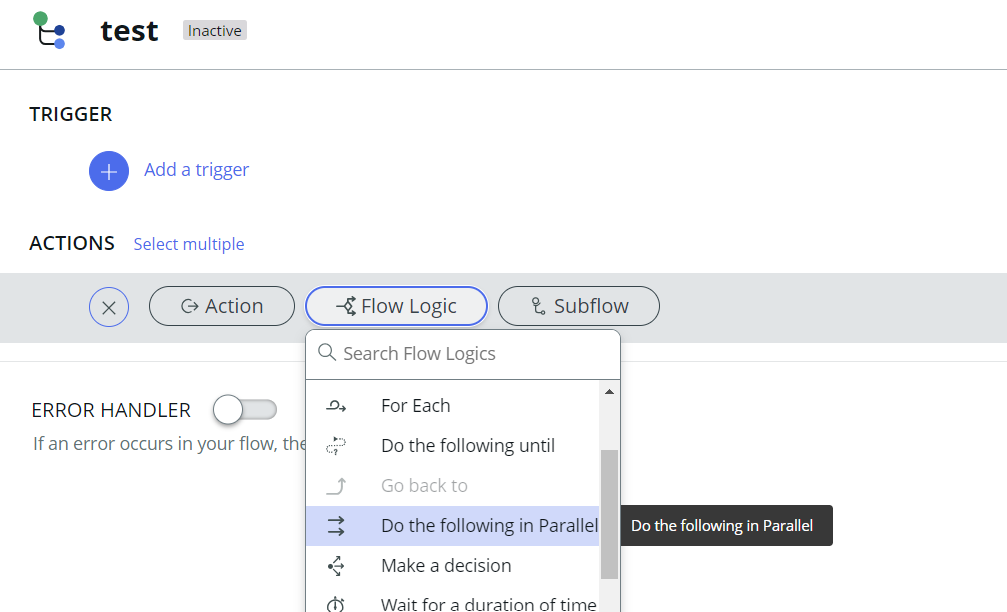
We can use flow logic "Do the following in parallel" this lets us execute multiple set of flow actions parallely.
How data is shared between two activities in Flow Designer?
We can use flow variables for passing values from one flow action to another in Flow designer. Also, we have Data panel and data pill picker to access global variables which are available at flow level.
How to call subflow/flow from client script?
ServiceNow has provided "FlowAPI" class to call Flow/Subflow/Actions by using scriping. However, this can only be called from Server side scriping. So, when we want it to be called from Client side, we can use GlideAjax to invoke server side script which will trigger Flow/Subflow/Actions.
Example script to call Flow from server side scripting:

How to trigger integration by using Flow Designer?
We have in built "Rest Step" in Flow designer to trigger integration. However, this step is not available in the base system and requires the ServiceNow Integration Hub subscription. After the required plugin is activated, the step is visible under Integrations.
Click here for more details about Rest Step in Flow Designer
What are the different stages of Flow Execution?
During flow execution, each stage can be in one of five states.
1. Pending - This stage has not yet started.
2. In progress - This stage is executing.
3. Skipped - This stage was skipped and did not run. Typically, this state is reached when a conditional flow logic block is not executed.
4. Complete - This stage is complete.
5. Error - This stage has reached an error condition.
How to write advanced server-side scripting in Flow Designer?
To write advanced server-side scripting in Flow Designer, we can create custom Flow Actions.
These actions enable us to write our own scripting logic, which can then be integrated into the main flow. This provides flexibility to implement complex business logic and enhance the functionality of your flows.
While you're deciding, someone else applying for the same role already started their 15-day plan.
No countdown, no gimmick, just a head start you can still catch up on.
🔒 Secure payment via Razorpay · Instant access after payment
Your story could be the reason someone else lands their next ServiceNow role
If this content made a real difference in your prep, sharing that experience with your network helps other professionals discover it — and we'd love to say thank you with 10 days of premium access, completely on us.
Real Interview Questions & Answers
Questions shared by ServiceNow professionals and reviewed for clarity, relevance, and interview usefulness.
🚀 Power Up Your ServiceNow Career
Join a growing community of smart ServiceNow professionals to stay ahead in interviews, sharpen your development skills, and accelerate your career.