ServiceNow Scripting Scenario Based Interview Questions 2026
Tip : For scripting related scenario based questions, usually interviewer asks you to login and share your PDI where you will have to write script. This way interviewer tries to understand your scripting skills.
Make sure you follow ServiceNow best practices while writing script.
e.g.
Do not use 'gr' variable name.
Give meaningful names to variables you declare.
Do not use multiple addQuery for single gliderecord instead try single 'addEncodedQuery'.
New: practise these scripts right here
Each scenario below has a Practice this in the sandbox button. Write your script, run it against realistic practice data and get it checked the way an interviewer would review it. No PDI needed. Nothing you run touches a real instance, and the data resets on every run.
We can use GlideAggregate API to achieve this scenario:
Script :
gs.print('State\\tIncident Count');
var grIncident=new GlideAggregate('incident');
grIncident.addEncodedQuery(' sys_updated_onONToday@javascript: gs.beginningOfToday()@javascript: gs.endOfToday()');
grIncident.addAggregate('COUNT','state');
grIncident.query();
while(grIncident.next()){
gs.print(grIncident.state. getDisplayValue()+'\t'+grIncident. getAggregate('COUNT','state'));
}
Output :

Note: This scripting question is common. However, they might ask for different table or different field. The primary learning here is whenever there is question related to finding count of the records, we are supposed to use GlideAggregate API. Do not use GlideRecord API with getRowCount method, it is not considered as best practice. Also make sure you understand how addAggregate, getAggregate and groupBy works in GlideAggregate API.
We can use GlideAggregate API to achieve this scenario:
Script :
gs.print('State\\tIncident Count');
var grIncident=new GlideAggregate('incident');
grIncident.addEncodedQuery(' sys_updated_onONToday@javascript: gs.beginningOfToday()@javascript: gs.endOfToday()');
grIncident.addAggregate('COUNT','state');
grIncident.query();
while(grIncident.next()){
gs.print(grIncident.state. getDisplayValue()+'\t'+grIncident. getAggregate('COUNT','state'));
}
Output :
Note: This scripting question is common. However, they might ask for different table or different field. The primary learning here is whenever there is question related to finding count of the records, we are supposed to use GlideAggregate API. Do not use GlideRecord API with getRowCount method, it is not considered as best practice. Also make sure you understand how addAggregate, getAggregate and groupBy works in GlideAggregate API.
Script :

Output :

Note: Many of you must already be knowing how GlideRecord works but here interviewer checks if you know how setLimit, orderBy or orderByDesc can be used for such scenarios.
Script :
Output :
Note: Many of you must already be knowing how GlideRecord works but here interviewer checks if you know how setLimit, orderBy or orderByDesc can be used for such scenarios.
We need to use GlideAggregate as we need to get count of incidents. Since, we need incidents Category and sub cateory wise, we need to apply grouping on 2 fields as shown below :
Script :

Output :
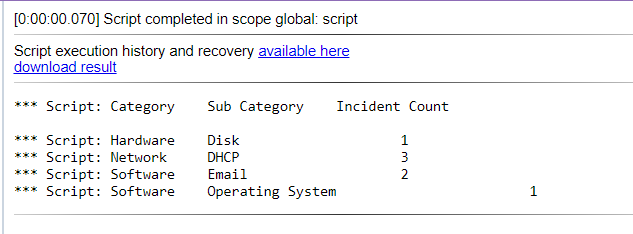
Note: Take away from this scenario is to understand how grouping on multiple fields can be used. Interviewer might change question to include 3-4 grouping fields so you should understand how grouping on multiple fields can be done via GlideAggregate API. Such multiple grouping logic is also quite useful if you want to do analysis on existing data.
We need to use GlideAggregate as we need to get count of incidents. Since, we need incidents Category and sub cateory wise, we need to apply grouping on 2 fields as shown below :
Script :
Output :
Note: Take away from this scenario is to understand how grouping on multiple fields can be used. Interviewer might change question to include 3-4 grouping fields so you should understand how grouping on multiple fields can be done via GlideAggregate API. Such multiple grouping logic is also quite useful if you want to do analysis on existing data.
1. You have to create one script inlcude with two function getIncidentDetails and sendDataToBackgroundScript.
2. getIncidentDetails should fetch first incident resolved today, this function should send Incident number, assignee user, resolved date and created date to sendDatToBackgroundScript function which is in the same script include.
3. sendDataToBackgroundScript function should calculate duration between created date and resolved date and return difference and Incident Number, Assignee User.
4. sendDataToBackgroundScript shoudl be called from background script and all data should be printed.
Background Script :

Script Include :

Output :

Note: Here interviewer tries to test your basic scripting knowledge, like calling script include from another script, sending multiple values from one function to another, finding date difference, basic usage of GlideRecord with setLimit and orderBy method. Interviewer might change scenarios to introduce more ServiceNow API's so prepare yourself with these all basic scripting knowledge.
Background Script :
Script Include :
Output :
Note: Here interviewer tries to test your basic scripting knowledge, like calling script include from another script, sending multiple values from one function to another, finding date difference, basic usage of GlideRecord with setLimit and orderBy method. Interviewer might change scenarios to introduce more ServiceNow API's so prepare yourself with these all basic scripting knowledge.
There are two methods to verify users access for any glide record.
1. Use GlideRecordSecure API while creating security incident. This API implicitly verifies if user passes ACL access on table.
2. Use canRead or canWrite function. These functions implicitly verifies if logged in user satisfies ACL access.
There are two methods to verify users access for any glide record.
1. Use GlideRecordSecure API while creating security incident. This API implicitly verifies if user passes ACL access on table.
2. Use canRead or canWrite function. These functions implicitly verifies if logged in user satisfies ACL access.
Counting means GlideAggregate, but there is a catch: GlideAggregate only returns groups that actually have incidents. To also show groups with 0, query the active groups separately and look up each count, defaulting to 0. That keeps it to two queries however many groups exist.
Script :
// 1. Count active incidents per group in ONE aggregate query
var counts = {};
var incAgg = new GlideAggregate('incident');
incAgg.addActiveQuery();
incAgg.addNotNullQuery('assignment_group');
incAgg.addAggregate('COUNT');
incAgg.groupBy('assignment_group');
incAgg.query();
while (incAgg.next()) {
    counts[incAgg.getValue('assignment_group')] = parseInt(incAgg.getAggregate('COUNT'), 10);
}

// 2. Walk every active group and print its count (0 when missing)
var groupGr = new GlideRecord('sys_user_group');
groupGr.addActiveQuery();
groupGr.orderBy('name');
groupGr.query();
while (groupGr.next()) {
    gs.info(groupGr.getValue('name') + ': ' + (counts[groupGr.getUniqueValue()] || 0));
}
Note: Interviewers use the "include zero" twist to see whether you understand what GlideAggregate returns. Looping over groups and calling getRowCount() for each one gives the same output but runs one query per group, which is the answer they are hoping you will not give.
Dot-walk to the assignee's user record inside the incident query: assigned_to.active=false. One query finds every affected incident; there is no need to loop over users first.
Script :
var count = 0;
var incidentGr = new GlideRecord('incident');
incidentGr.addEncodedQuery('active=true^assigned_to.active=false');
incidentGr.query();
while (incidentGr.next()) {
    incidentGr.setValue('assigned_to', '');
    incidentGr.update();
    count++;
}
gs.info('Unassigned ' + count + ' incident(s)');
Note: This is a common real-world clean-up. Keep the assignment group so the ticket goes back to the team's queue, and say why you let Business Rules run (no setWorkflow(false)) - the reassignment is a genuine change people should see.
Reference fields store sys_ids, so look the caller and the group up by name first, check that both were found, then initialize(), set the values and insert(). On a real instance, priority is calculated from impact and urgency, so set those two.
Script :
var callerGr = new GlideRecord('sys_user');
var groupGr = new GlideRecord('sys_user_group');
if (!callerGr.get('name', 'Anita Desai') || !groupGr.get('name', 'Database')) {
    gs.error('Caller or group not found');
} else {
    var incidentGr = new GlideRecord('incident');
    incidentGr.initialize();
    incidentGr.setValue('caller_id', callerGr.getUniqueValue());
    incidentGr.setValue('assignment_group', groupGr.getUniqueValue());
    incidentGr.setValue('short_description', 'Production database is down');
    incidentGr.setValue('category', 'database');
    incidentGr.setValue('impact', 1);
    incidentGr.setValue('urgency', 1);
    incidentGr.insert();
    gs.info('Created ' + incidentGr.getValue('number'));
}
Note: Never hard-code sys_ids in an interview answer - they are different on every instance. Setting caller_id to the text "Anita Desai" is another classic mistake: it stores a broken reference instead of the user.
^OR binds to the condition right before it, so (P1 OR P2) AND (Network OR Database) is written as below. An IN list is a shorter alternative: active=true^priorityIN1,2^assignment_group.nameINNetwork,Database.
Script :
var incidentGr = new GlideRecord('incident');
incidentGr.addEncodedQuery('active=true^priority=1^ORpriority=2^assignment_group.name=Network^ORassignment_group.name=Database');
incidentGr.query();
while (incidentGr.next()) {
    gs.info(incidentGr.getValue('number') + ' | ' + incidentGr.priority.getDisplayValue() + ' | ' + incidentGr.assignment_group.getDisplayValue());
}
Note: The trap is ^NQ: it does not mean "or" between two conditions, it starts a completely separate query. With ^NQ in the middle, every Database incident matches regardless of priority. Build the filter in a list view and use Copy query if you are unsure.
Query the membership table sys_user_grmember and dot-walk to the group's active flag. One query answers the question.
Script :
var memberGr = new GlideRecord('sys_user_grmember');
memberGr.addQuery('group.active', false);
memberGr.query();
while (memberGr.next()) {
    gs.info(memberGr.user.getDisplayValue() + ' -> ' + memberGr.group.getDisplayValue());
}
Note: Knowing that sys_user_grmember is the many-to-many table between users and groups is the real test here. In an actual clean-up you would also remove these memberships, because users keep the roles inherited from the group.
Interviewers forget your perfect answer in 5 minutes. They remember how confidently you delivered it.
Confidence comes from repetition, not luck. The Job Switch Kit is where you build it.
🔒 Secure payment via Razorpay · Instant access after payment
Your story could be the reason someone else lands their next ServiceNow role
If this content made a real difference in your prep, sharing that experience with your network helps other professionals discover it — and we'd love to say thank you with 10 days of premium access, completely on us.
Real Interview Questions & Answers
Questions shared by ServiceNow professionals and reviewed for clarity, relevance, and interview usefulness.
🚀 Power Up Your ServiceNow Career
Join a growing community of smart ServiceNow professionals to stay ahead in interviews, sharpen your development skills, and accelerate your career.